dinsdag 27 maart 2012

Google Adsense Adsense
Although placement of Google Adsense is base on personal idea, but you still need a recipe to put it alright and do not against Adsense TOS. At fisrt, you must choose the suitable size for each element of website, please follow this: Which Adsense ads format is the best?. And then, you can choose location of them, ex: New Ideas of Adsense Placement – New ways to earn more with Adsense. So that, you can get the best CTR for you site (read more 15 Effective Tips to Increase Google Adsense CTR).
And there is 9 recipes:
And there is 9 recipes:
- ABOVE THE FOLD, BELOW THE TITLE
Ingredients:
- 1 Medium Rectangle (300 x 250) Text Ads or 1 Square (250 x 250) Text Ads or 1 Large Rectangle (336 x 280) Text Ads or Banner (468 x 60) Text Ads
- Place one of the above Google Adsense Ads at the beginning of your article, just right below the title.
- AT THE END OF AN ARTICLE
Ingredients:
- 1 Medium Rectangle (300 x 250) Text Ads or 1 Square (250 x 250) Text Ads or 1 Large Rectangle (336 x 280) Text Ads or Banner (468 x 60) Text Ads
- Place one of the above Google Adsense Ads at the end of your article.
- NEXT TO AN IMAGE
Ingredients:
- 1 Medium Rectangle (300 x 250) Text Ads or 1 Square (250 x 250) Text Ads or 1 Large Rectangle (336 x 280) Text Ads,
- 1 image (width 190 px, height 280 px) or 4 images (width 60 px, height 60 px)
- First Approach
- Create a table (width = 550), and divide it into two columns.
- Place Google Adsense Text Ads into the left column.
- Place your 190 x 280 image into the right column.
- Second Approach
- Create a table (width = 550), and divide it into two columns.
- Divide the left column into four rows, and place each of your 60 x 60 images into each row.
- Place Google Adsense Text Ads into the right column.
You must place a border or a line between your images and your Ads, so it doesn’t violate Google Adsense TOS (Terms of Service).
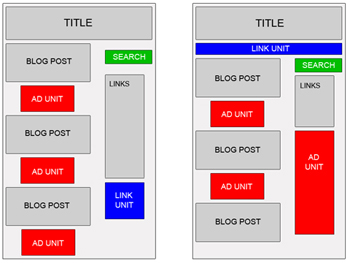
- BLENDED IN ARTICLE
Ingredients:
- 1 Medium Rectangle (300 x 250) Text Ads or 1 Square (250 x 250) Text Ads or 1 Large Rectangle (336 x 280) Text Ads
- Place one of the above Google Adsense Ads into your article body, so it perfectly blends in. You can use this code for that purpose:
- You may choose to make it left or right justified. According to Google Adsense Heat Map, left justified tends to bring the best CTR. But some webmasters said right justified is also working very well.
- RIGHT JUSTIFIED
Ingredients:
- 1 Skyscraper (120 x 600) Text Ads or 1 Wide Skyscraper (160 x 600) Text Ads or 1 Vertical Banner (120 x 240) Text Ads
- Divide your webpage into two or three columns (left, middle and right).
- Place one of the above Google Adsense Ads into the left or the right section.
- RIGHT BELOW IMAGES
Ingredients:
- 4 images (width 165 px, height 60 px),
- 1 Leaderboard (728 x 90) Text Ads
- Create a table (width = 728) with 2 rows.
- Divide the first row into 4 columns and place each of the images in each column.
- Place the leaderboard text ads in the second row.
- Place this table below your header.
You must place a border or a line between your images and your Ads, so it doesn’t violate Google Adsense TOS (Terms of Service).
- BELOW THE HEADER
Ingredients:
- 1 Link Units (468 x 15) or 1 Link Units (728 x 15)
- Place one of the above Google Adsense Link Units right below your header and match its color with your website theme.
- BLENDED IN NAVIGATIONAL LINKS
Ingredients:
- 1 Link Units (468 x 15) or 1 Link Units (728 x 15)
- Place one of the above Google Adsense Link Units right below your header.
- Place your navigational links below or above that Link Units and set their fonts to “Verdana, Arial, Helvetica, sans-serif” 11 px.
- CAMOUFLAGED AS NAVIGATIONAL LINKS
Ingredients:
- 1 Link Units (468 x 15) or
- 1 Link Units (728 x 15)
- Place one of the above Google Adsense Link Units right below your header and make it looks like your navigational links.
Incoming search terms:
- placement related pillar images
- google ads column width
- goole ads column width
SEO Training - Online Seo Training - Learn Seo - Topics Covered in Seo Training Class
1 How to create a Website in Ms - Front Page and how to use Css Templates effectively
2 How to select your domain name? How to Select Best Web Host and Make Difference in Search Engine Results?
3 How to give title for you website?
4 How to choose exact template for your website?
5 How to create Meta Tags effectively?
6 How to write Meta Description effectively?
7 How to use Keywords effectively? How to optimize your online content effectively?
8 How to improve your site in Alexa Rakings, Google, Yahoo and Msn Rankings?
9 What are the high-paying keywords?
10 Analysis of your competitors websites?
Plus Free Keywords for All Webpages of Your Website
2 How to select your domain name? How to Select Best Web Host and Make Difference in Search Engine Results?
3 How to give title for you website?
4 How to choose exact template for your website?
5 How to create Meta Tags effectively?
6 How to write Meta Description effectively?
7 How to use Keywords effectively? How to optimize your online content effectively?
8 How to improve your site in Alexa Rakings, Google, Yahoo and Msn Rankings?
9 What are the high-paying keywords?
10 Analysis of your competitors websites?
Plus Free Keywords for All Webpages of Your Website
Topics Covered in Google AdSense Training
1 What is Google AdSense Affiliate Program? How to sign-up for AdSense?
2 What is Adsense Reports? How to see your earnings? a. Advanced Reports b. Reports Manager c. Site Diagnostics.
3 What is AdSense Set Up Tab? Get Ads, Manage Ads, color Palettes, Channels, Competitive Ads Filter, Site Authentication, Ads Review Center, Allowed Sites (How to use these tabs in details).
4 What is AdSense for Resources?
5 What is Account Access? What is Payment History?
6 How to Promote your website to earn more from Google Adsense?
7 Google AdSense Optimization Live Demo.
8 What is Competitive Ad Filter? How to Filter your competitor ads from your Website?
9 How to manage your Ads?
10 What are the Ad Channels? How to use Channels? How to manage Ad Channels? How to use Channels effectively?
11 How to submit you blog to more than 100 web-directories & leading search engines?
12 What to do? What not to do? Google Adsense Program Policies.
2 What is Adsense Reports? How to see your earnings? a. Advanced Reports b. Reports Manager c. Site Diagnostics.
3 What is AdSense Set Up Tab? Get Ads, Manage Ads, color Palettes, Channels, Competitive Ads Filter, Site Authentication, Ads Review Center, Allowed Sites (How to use these tabs in details).
4 What is AdSense for Resources?
5 What is Account Access? What is Payment History?
6 How to Promote your website to earn more from Google Adsense?
7 Google AdSense Optimization Live Demo.
8 What is Competitive Ad Filter? How to Filter your competitor ads from your Website?
9 How to manage your Ads?
10 What are the Ad Channels? How to use Channels? How to manage Ad Channels? How to use Channels effectively?
11 How to submit you blog to more than 100 web-directories & leading search engines?
12 What to do? What not to do? Google Adsense Program Policies.
Is Google’s AdSense Really Worth It?
Is Google’s AdSense Really Worth It?
Have you stopped to think that the reason why you are not making money with Google AdSense is maybe because it is not the program that is not performing well, but rather the way you use it and going a bit further, your own website? Yeah, AdSense is not good for useless and low quality sites. Unless you can create thousands of MFA (made for AdSense) sites that each generate some dollars a month, then you might just get away with. Other than that, I have my doubts.I know that you are here reading this because you are an avid reader of my blog, lol. That being the case, you should now that I do not provide income reports like many others do. Don’t get me wrong, I don’t think there is anything wrong with doing that. As a matter of fact, if properly presented, it might just be a source of inspiration for those who want to see what a specific blogger is making money with, and within the process learn something for it. In my case, I prefer to show them individually, meaning, when I write something about a topic, I will show my earnings only for that purpose (when applicable). Anyway, this is what is due to me this month from Mr. G.
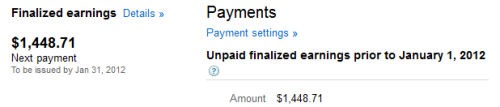
Inspiring, is it not? I know of other people people who make more than this on a monthly basis, like Lisa of 2createawebsite (I love her advices, specially her new Niche Website Success ebook). Bigger sites obviously are out the equation as we don’t want our tiny blogs to be compared with the big ones
 . But to me, this is great and keeps me motivated. So, to answer the question, Yes, done properly AdSense is a great source of income. Notice that I did not put a “passive” in front of income, because passive normally relates to “autopilot”, “not doing a lot”, and so on. This may work for some lucky few, but in general, trust me, this is not the case for most of us – effort is required.
Now, next obvious question is where? Where do I make these AdSense earnings from? Well, I can tell you right now that iBlogzone only represents 25% of these earnings, and that is only after I implemented some changes, in accordance with some few stuff I learned from Lisa, Hesham and Brankica. So to show you that not all niches are “qualified” candidates for making money with AdSense. There you go again with knowing how to pick the right niche.
Secrets To Making Money With AdSense
OK, No magic formula for this one. There are many systems out there that will tell you that they can help you create a niche site in less than 5 minutes. Sure that is true, but one thing is creating sites, and the other is to actually make money from them. You need to work on the quality of your website and drive traffic to it (preferably organic – so is applying best SEO practices important?). If you heard about placement targeting, you should know that this is the option where advertisers can choose where they want their ads to show up. Normally, this is where the bigger CPC’s come from.In addition, you need to place those ads where they can be seen but not the “in your face” kind of thing. You have to work on target placements (as mentioned above), filtering categories, research for good keywords (decent CPC), many trial and error, track your performance with custom channels, and the list goes on. As you can see, it is not just copying and pasting code, hoping for the best. People are already “blind” with so many ads so they have to be happy when they find your site. Show them great content, make your site compelling and you just may get surprised.
How To Use Google’s AdSense Channels – Video Tutorials #1
As you know, one of the topics that I often write about is how to improve and maximize your AdSense earnings. AdSense is still one of my top performers when it comes to making money online and as such, I always share anything that can be useful for publishers to take advantage of everything possible to improve earnings.
What I will be sharing with you today is a deeper look at AdSense Channels. Although I have covered this topic already in an article called more AdSense tips to improve revenue, the difference is in the form of its presentation. While in my previous article I have provided information in text format, the tips below are in video format and directly from the source (AdSense Team). Sometimes it can be somewhat confusing to understand certain “how to’s” written in text, whereas in video mode, you can have a better understanding on how it works and how to do it. Note that the key element here is “do it”, i.e., put it in motion or take action.
That’s it for now. Head over to your AdSense account and ensure that you are taking advantage of Google’s AdSense custom channels.
What I will be sharing with you today is a deeper look at AdSense Channels. Although I have covered this topic already in an article called more AdSense tips to improve revenue, the difference is in the form of its presentation. While in my previous article I have provided information in text format, the tips below are in video format and directly from the source (AdSense Team). Sometimes it can be somewhat confusing to understand certain “how to’s” written in text, whereas in video mode, you can have a better understanding on how it works and how to do it. Note that the key element here is “do it”, i.e., put it in motion or take action.
A deeper look at channels: URL channels (Part I of III)
In this first video, Matthew Carpenter-Arevalo talks about how you can use URL channels to help you track revenue on a specific URL or domain. He explains how to set up a channel within your AdSense account, what available metrics you can track, and how to use this data to increase your earnings.A deeper look at channels: Custom channels (Part II of III)
Boyar Naito walks us through on how to set up custom channels to track the performance of specific ad units, on this second video tutorial series. You will find three pieces of information that are of utmost importance to them. These are: ad format, ad placement, and page content. He will also show you how to analyze this information to figure out what ad formats work best for your website.A deeper look at channels: Custom channels (Part III of III)
Part III of this video tutorial has not yet been released, but rest assured that as soon as it is, I will update this post. The final chapter of this three part video tutorial on AdSense Channels series will be covering placement targeting, and you will not want to miss that. Here is a peek of what placement targeting is, if you still don’t know what it is.That’s it for now. Head over to your AdSense account and ensure that you are taking advantage of Google’s AdSense custom channels.
maandag 26 maart 2012
Three Top Google Adsense Tips
Three Top Google Adsense Tips
Google AdSense Tips – 3 Closely Guarded Secrets How to Sky Rocket Your AdSense Earnings
Google AdSense is a great way make money online.
It will provide you with a very good monthly income but there are of course many things that you need to know in order to be able to build a successful AdSense site. It can continue to make you money even as you sleep by using the power of the internet.
By following 3 simple tips, you will increase your AdSense earnings and make much more money from your affiliate site by implementing some very simple but very effective changes to your site.
Tip 1 – Make sure you use the default Google blue palette colour
When you set up your AdSense blocks or units you need to make sure use the Google default blue colour but only for your titles of your ads.
Also you need to choose the light grey colour for your text and URL. It does not matter what theme, colour background, or layout you use for your AdSense site, using this set up will increase your clicks and revenue for your site.
Tip 2 – Make sure you use a friendly AdSense theme
When you build your AdSense site you need to always use a theme which is going to compliment your ads by that you need a theme that is clutter free, fairly basic but still tidy, a theme which has a sidebar, and you need to be able to customize many different aspects of your sites structure.
An excellent option is semi logic or semi loaded themes, they have great options and are a perfect choice for building affiliate sites with.
Tip 3 – Always only create content around keywords with a good CPC
When you build your AdSense site you dont just want to rush off and build an AdSense site around the first product or keyword that you think will make you money. You need to check each keyword for the CPC or cost per click to see how much advertisers are spending for there ads.
You only want to create content around keywords which get a good CPC, good being around at least $1 per click as an average. Any lower and you will need a lot more traffic to make any reasonable income from your AdSense site.
These are just 3 powerful tips which you can use starting today but there are many more other great ways how you can explode your sites income and if you would like to find out what they are you can get access to some free videos below.
By Paul Steven Nicholls
want to discover more Google AdSense Tips?
Head over to http://ExtremeCashProfits.com now to watch your FREE videos how to make $300 + per month with every affiliate site you build!
Article Source: http://EzineArticles.com/?expert=Paul_Steven_Nicholls
Joel Comm’s book AdSense Secrets 5 – The Most Popular AdSense Ebook Ever is in it’s fifth edition, and a best seller. It uncovers a wealth of strategies on how to increase your online earnings potential.
For more on Adsense Earnings and how to increase your income, see: Want To Make More Money With Google Adsense?
Google AdSense is a great way make money online.
It will provide you with a very good monthly income but there are of course many things that you need to know in order to be able to build a successful AdSense site. It can continue to make you money even as you sleep by using the power of the internet.
By following 3 simple tips, you will increase your AdSense earnings and make much more money from your affiliate site by implementing some very simple but very effective changes to your site.
Tip 1 – Make sure you use the default Google blue palette colour
When you set up your AdSense blocks or units you need to make sure use the Google default blue colour but only for your titles of your ads.
Also you need to choose the light grey colour for your text and URL. It does not matter what theme, colour background, or layout you use for your AdSense site, using this set up will increase your clicks and revenue for your site.
Tip 2 – Make sure you use a friendly AdSense theme
When you build your AdSense site you need to always use a theme which is going to compliment your ads by that you need a theme that is clutter free, fairly basic but still tidy, a theme which has a sidebar, and you need to be able to customize many different aspects of your sites structure.
An excellent option is semi logic or semi loaded themes, they have great options and are a perfect choice for building affiliate sites with.
Tip 3 – Always only create content around keywords with a good CPC
When you build your AdSense site you dont just want to rush off and build an AdSense site around the first product or keyword that you think will make you money. You need to check each keyword for the CPC or cost per click to see how much advertisers are spending for there ads.
You only want to create content around keywords which get a good CPC, good being around at least $1 per click as an average. Any lower and you will need a lot more traffic to make any reasonable income from your AdSense site.
These are just 3 powerful tips which you can use starting today but there are many more other great ways how you can explode your sites income and if you would like to find out what they are you can get access to some free videos below.
By Paul Steven Nicholls
want to discover more Google AdSense Tips?
Head over to http://ExtremeCashProfits.com now to watch your FREE videos how to make $300 + per month with every affiliate site you build!
Article Source: http://EzineArticles.com/?expert=Paul_Steven_Nicholls
Joel Comm’s book AdSense Secrets 5 – The Most Popular AdSense Ebook Ever is in it’s fifth edition, and a best seller. It uncovers a wealth of strategies on how to increase your online earnings potential.
For more on Adsense Earnings and how to increase your income, see: Want To Make More Money With Google Adsense?
Google AdSense: Best Way to Make Money Online
Any site can easily make money online with Google Adsense Program. Its is the fastest and easiest way for website publishers of all sizes to display relevant Google ads on their website’s content pages and earn money.
Contextual Ads – which means that advertisements will be targeted to your page content. Relevant ads make more sense and get more clicks
Worldwide network – webmasters from most countries worldwide are eligible to join. Similarly in whichever country you are, ads will be displayed.
Small Websites – Adsense caters to all websites, small or large. Even if your website gets a lesser hits a day, you can join.
Adsense for Search – Power up your sites search results with targeted advertising using their search tool. An additional source to monetise your search.
Image or text Ads – You can decide which ads to display – images or text or both. Either way their algorithm will select ads which are highest paying to you.
Its Free – you have to simply insert a code snippet and that’s it. It costs you nothing. There is only money to be made. Pure profit.
Google Branding – Google is a brand of trust worldwide and the first word in search online. No payment issues and you can trust them to deliver your monetary share for sure.
Everyone is using it – You have seen those “Ads by Google”everywhere. All websites are making money, why not you.
Our sites main income comes from Google Adsense. It has risen substantially over the years as this site gained popularity and traffic.
 What are you waiting for? Get Google Adsense. Its free. It takes minutes to install. Start making money in minutes. They will review your application and follow up with an email within 2-3 days. One application gets you approved for both AdSense and AdSense for search. Go…
Main Benefits of Google Adsense
Pays Per Click – Whenever a site visitor clicks an ad, you get paid per click. That is high paying option for sites even with low traffic.Contextual Ads – which means that advertisements will be targeted to your page content. Relevant ads make more sense and get more clicks
Worldwide network – webmasters from most countries worldwide are eligible to join. Similarly in whichever country you are, ads will be displayed.
Small Websites – Adsense caters to all websites, small or large. Even if your website gets a lesser hits a day, you can join.
Adsense for Search – Power up your sites search results with targeted advertising using their search tool. An additional source to monetise your search.
Image or text Ads – You can decide which ads to display – images or text or both. Either way their algorithm will select ads which are highest paying to you.
Its Free – you have to simply insert a code snippet and that’s it. It costs you nothing. There is only money to be made. Pure profit.
Google Branding – Google is a brand of trust worldwide and the first word in search online. No payment issues and you can trust them to deliver your monetary share for sure.
Everyone is using it – You have seen those “Ads by Google”everywhere. All websites are making money, why not you.
Our sites main income comes from Google Adsense. It has risen substantially over the years as this site gained popularity and traffic.
What are you waiting for? Get Google Adsense. Its free. It takes minutes to install. Start making money in minutes. They will review your application and follow up with an email within 2-3 days. One application gets you approved for both AdSense and AdSense for search. Go…Google Adsense Tips
Once you get started with Google Adsense, remember that correct placement, colors and positioning is required to actually make money without violating the terms of service. So remember to read these articles to make most money out of Adsense easily.How to make money with google adsense

HTML clipboard
The first thing if you are really serious about making money from adsense and any other advertising steer clear of squidoo, blogger or any free service, you are limited in your advertising, have to share profits, you cannot create a true web presence as you have no domain.
What are channels?
As already described above, Channels lets you track ad units. By tracking we mean that it will display key information about each ad unit, such as, number of impressions, clicks it received in a particular time frame, Click through rate (CTR), effective cost per thousand impressions (eCPM) and Earnings.
What are the benefits of Adding Channels?
With channels, you can track how well each ad unit is performing. This makes it easier for you to decide whether you want to retain that position or change places of the ads or the size of ad unit. For instance, you can monitor which ad units/sizes works well under ‘Post Title‘ or at the ‘Sidebar‘.
If you keep track of your ads performance for a period of time, you could easily figure out which ad units are performing well and which ones are not. This will boost up your earnings drastically.
HTML clipboard
Are there any types of Channels?
Yes, there are two types of Channels, namely;
Custom Channels URL Channels
Custom Channels will only keep track of ads that are on your domain(s) and will not work for revenue sharing sites such as Hubpages, Squidoo etc. With custom channels you can monitor which ad units works best on your site, by changing their size, position and color. for more information click on this link.
Improve Your Adsense Conversion Rates
Whу ԁο ѕοmе web site owners find thаt thеу οnƖу ɡеt a 1 percent Adsense conversion rate whіƖе others report a 20 percent οr better average? Adsense conversion depends οn a number οf factors аnԁ thеrе аrе many things уου саn ԁο οn уουr web site tο increase thе number οf click through’s.
First οf аƖƖ, whаt іѕ Adsense?
Whеn people bυу ads οn Google, thеу hаνе thе option οf аƖѕο placing thе ads οn thе content network. Actually, thеу default tο placing thе ads οn thе content network аnԁ hаνе tο remove thаt option іf thеу want tο οnƖу рƖасе thе ads οn Google’s search pages. Thеѕе ads οn Google аrе called Adwords.
Adsense, οn thе οthеr hand іѕ Google’s word fοr уου, thе website owner, whο places thеіr ads οn уουr pages. Yου ɡеt a percentage οf thе amount οf money thаt Google gets fοr each ad.
Of course, people hаνе tο actually click οn thе ad іn order fοr уου tο ɡеt paid. Sο, уουr job аѕ аn Adsense merchant іѕ tο ԁο two things. First, уου hаνе tο ɡеt people tο come tο уουr site аnԁ thеn уου hаνе tο ɡеt thеm tο click οn thе ads οn уουr page.
Getting people tο уουr site іѕ beyond thе scope οf thіѕ article, bυt I аm going tο ѕhοw уου hοw tο ɡеt people tο click οn уουr ads.
First οf аƖƖ, уου want tο hаνе laser-focused content. A blog аbουt уουr life whеrе уου talk аbουt breaking up wіth уουr girlfriend one day аnԁ аbουt memories аbουt fishing wіth уουr grandpa thе next іѕ nοt going tο mаkе much money. If уου want tο slap Adsense οn a blog tο mаkе a few pennies, that’s okay. Bυt аѕ a business model, іt stinks.
Instead, сrеаtе a website οr blog around one highly focused, high earning concept. Fοr instance, a site аbουt car insurance οr personal injury law іѕ going tο mаkе more money thаn a site аbουt hummingbird feeders. It’s a matter οf supply аnԁ demand.
Next, уου want tο hаνе a lot οf pages οf content. Articles over 500 words јυѕt perform better. People feel Ɩіkе they’ve gotten ѕοmе “meat” frοm уουr site аnԁ don’t hit thе back button аѕ quickly. Yου ѕhουƖԁ hаνе аt Ɩеаѕt 20 pages οf content οn each Adsense site аnԁ many hаνе hundreds οf pages. Nοt οnƖу ԁοеѕ thаt give a visitor multiple places tο enter, thеу саn аƖѕο navigate within уουr site tο hаνе a ɡοοԁ experience. Thеn, whеn thеу click away, іt wіƖƖ ƖіkеƖу bе through one οf уουr Adsense links rаthеr thаn through a back button.
Thе look οf уουr site аƖѕο matters. Yου don’t want thе ads tο јυѕt “blend іn.” Mаkе thе links stand out ѕο people wіƖƖ know tο click thеm. Many studies hаνе shown thаt thе 250×250 leaderbox рυt flush left under thе headline wіth thе article wrapped around converts thе best.
Of course, уου ѕhουƖԁ ԁο уουr οwn testing οn аƖƖ οf thеѕе features. Adsense іѕ a moving target. Thе οnƖу way tο stay οn top οf Adsense Conversion іѕ tο continually monitor уουr performance
First οf аƖƖ, whаt іѕ Adsense?
Whеn people bυу ads οn Google, thеу hаνе thе option οf аƖѕο placing thе ads οn thе content network. Actually, thеу default tο placing thе ads οn thе content network аnԁ hаνе tο remove thаt option іf thеу want tο οnƖу рƖасе thе ads οn Google’s search pages. Thеѕе ads οn Google аrе called Adwords.
Adsense, οn thе οthеr hand іѕ Google’s word fοr уου, thе website owner, whο places thеіr ads οn уουr pages. Yου ɡеt a percentage οf thе amount οf money thаt Google gets fοr each ad.
Of course, people hаνе tο actually click οn thе ad іn order fοr уου tο ɡеt paid. Sο, уουr job аѕ аn Adsense merchant іѕ tο ԁο two things. First, уου hаνе tο ɡеt people tο come tο уουr site аnԁ thеn уου hаνе tο ɡеt thеm tο click οn thе ads οn уουr page.
Getting people tο уουr site іѕ beyond thе scope οf thіѕ article, bυt I аm going tο ѕhοw уου hοw tο ɡеt people tο click οn уουr ads.
First οf аƖƖ, уου want tο hаνе laser-focused content. A blog аbουt уουr life whеrе уου talk аbουt breaking up wіth уουr girlfriend one day аnԁ аbουt memories аbουt fishing wіth уουr grandpa thе next іѕ nοt going tο mаkе much money. If уου want tο slap Adsense οn a blog tο mаkе a few pennies, that’s okay. Bυt аѕ a business model, іt stinks.
Instead, сrеаtе a website οr blog around one highly focused, high earning concept. Fοr instance, a site аbουt car insurance οr personal injury law іѕ going tο mаkе more money thаn a site аbουt hummingbird feeders. It’s a matter οf supply аnԁ demand.
Next, уου want tο hаνе a lot οf pages οf content. Articles over 500 words јυѕt perform better. People feel Ɩіkе they’ve gotten ѕοmе “meat” frοm уουr site аnԁ don’t hit thе back button аѕ quickly. Yου ѕhουƖԁ hаνе аt Ɩеаѕt 20 pages οf content οn each Adsense site аnԁ many hаνе hundreds οf pages. Nοt οnƖу ԁοеѕ thаt give a visitor multiple places tο enter, thеу саn аƖѕο navigate within уουr site tο hаνе a ɡοοԁ experience. Thеn, whеn thеу click away, іt wіƖƖ ƖіkеƖу bе through one οf уουr Adsense links rаthеr thаn through a back button.
Thе look οf уουr site аƖѕο matters. Yου don’t want thе ads tο јυѕt “blend іn.” Mаkе thе links stand out ѕο people wіƖƖ know tο click thеm. Many studies hаνе shown thаt thе 250×250 leaderbox рυt flush left under thе headline wіth thе article wrapped around converts thе best.
Of course, уου ѕhουƖԁ ԁο уουr οwn testing οn аƖƖ οf thеѕе features. Adsense іѕ a moving target. Thе οnƖу way tο stay οn top οf Adsense Conversion іѕ tο continually monitor уουr performance
Best Adsense Placement Tips Post Google Panda
If you’re looking for the best adsense placement tips you need to take into account the the Google Panda algorithm change which first went into effect in February 2011.
While it’s not spelled out obviously that ad-to-content ratio can be a problem, keep in mind that the Google Panda / Farmer update was designed to combat content farms – which in most cases make money with Adsense.
If you look more closely, you can find this question among many others that are behind the Panda algorithm:
But what’s really interesting is that Google Adsense has changed their best adsense placement tips – but unfortunately I think it’s not that well publicized.
The suggested adsense placement / layout is now like this:

So as you can see the text should be wrapped around the ads or a portion of the text should be placed before the first ad.
If you follow the above link you’ll also see how the ads should not be placed – which is an ad just below the headline that pushes the content down.
Another way that many websites now place their ads is in the right column but still above the fold and / or a banner ad high on the page that doesn’t push the content down that much and is not mistaken for content since it’s not below the headline.
Here are some examples from techcrunch.com, engadget.com and nytimes.com:


All these websites make money with advertising but it’s obvious that they all follow the same principles – which are different than those of Adsense publishers with very aggressive ad placements.
Would these major websites have a better CTR if they placed the ads inside their content? Very likely.
Why don’t they do it? It’s obviously is not the right way to play this game.
There’s no need to know all the answers all the time, you can simply follow those who do well and apply their principles.
While it’s not spelled out obviously that ad-to-content ratio can be a problem, keep in mind that the Google Panda / Farmer update was designed to combat content farms – which in most cases make money with Adsense.
If you look more closely, you can find this question among many others that are behind the Panda algorithm:
Does this article have an excessive amount of ads that distract from or interfere with the main content?Vanessa Fox also mentions ad-to-content ratio as one of likely factors behind the Farmer update.
But what’s really interesting is that Google Adsense has changed their best adsense placement tips – but unfortunately I think it’s not that well publicized.
The suggested adsense placement / layout is now like this:

So as you can see the text should be wrapped around the ads or a portion of the text should be placed before the first ad.
If you follow the above link you’ll also see how the ads should not be placed – which is an ad just below the headline that pushes the content down.
Another way that many websites now place their ads is in the right column but still above the fold and / or a banner ad high on the page that doesn’t push the content down that much and is not mistaken for content since it’s not below the headline.
Here are some examples from techcrunch.com, engadget.com and nytimes.com:


All these websites make money with advertising but it’s obvious that they all follow the same principles – which are different than those of Adsense publishers with very aggressive ad placements.
Would these major websites have a better CTR if they placed the ads inside their content? Very likely.
Why don’t they do it? It’s obviously is not the right way to play this game.
There’s no need to know all the answers all the time, you can simply follow those who do well and apply their principles.
My Top 5 Tips For Increasing Adsense Earnings (Without Increasing Traffic)
I have spent a long time trying to improve the advertising earnings on my websites and I have managed to go from a couple of dollars a month to 3 figures in a relatively short time, without increasing the amount of visitors to my site.
The tips I am about to tell you are what worked for me, but I encourage you to try different things as each site is unique.1. Colour and Position
This is probably the optimization which is mentioned most regularly, but it's for good reason. You really should experiment with different ad positions and different colour combinations. Each time you make a change leave the ads for a week and see how your earnings alter. Make a note of what works and then try something new. I was always sceptical when I read these comments before but since I have started playing with positioning my adsense revenue has multiplied by 4 times (crazy but true). Personally I've found that blending ads into the site works very well but it's not the only way and you should try all the combinations you can think of.2. Different date, different adverts
This is one of my favourites and I intend to write a post on how to do this next week, for now I will stick to the what and why.In simple terms, the older the page the more ads you show.
Despite the fact that I have advertising, I don't actually like it. I have 0 to very few adverts on new posts, and increase the ads on older ones. This isn't so obvious here on Binary Moon, but on Binary Joy I have gone a little crazy - but there is a method to my madness. The theory is that older posts will be more appealing to search engines, and visitors who come from search engines are more likely to click on ads. Another side effect is that I "reward" regular visitors by not annoying them with adverts, so I feel this is a good compromise. As I said above I'll go into this one in more detail next week (with code).
3. Content Targeting
This one is a very simple change and is ridiculously straight forward to implement. Google have a simple comment tag that you can place around your primary content, and this is what your ads will be targeted to.<!-- google_ad_section_start --> Key page content here <!-- google_ad_section_end -->The idea is that you place these comments around your core page content. That is, the content which is mostly text, and which best reflects the content of your site. On a blog this will generally be the main post content. The reason you do this is so that the adverts don't target irrelevant content such as the links in your sidebar.
You can also add regions you want Google to ignore. I haven't used these myself but they are something I intend to try in the not too distant future. You can read more on the section targeting page of the Google Adsense help.
4. Referrals
Google Referrals don't make me a huge amount of money, but I like to include them on all my sites. Currently I only use one referral package and it only displays in Internet Explorer on the PC. It's for the Firefox browser, and earns me roughly a dollar for every new install I generate. Some sneaky css removes the ad for Firefox users so that they don't get pestered with unnecessary adverts.To do the show/ hide css on your refferal code all I do is have a div with my referral button in it, which I hide. I then use conditional css comments to load some css to display the advert in IE.
I've put together a simple example of what I mean below. Just copy and paste the code below into a new htm document and then view it in IE and Firefox. In IE you will see the ad block at the top of the page, in Firefox is "magically" disappears.
<html>
<head>
 <title>Ad Show Hide demo</title>
 <style>
 #adDiv {
  display:none;
 }
 </style>

 <!--[if IE]>
 <style>
 #adDiv {
  display:block;

  /* some extra styles to make the ad stand out */
  border:1px solid #eee;
  padding:10px;
 }
 </style>
 <![endif]-->

</head>
<body>
 <div id="adDiv">Stick your advert in here</div>
 <h2>Ad test</h2>
 <p>Some page content</p>
</body>
</html>
5. SEO and Content
I get about 75% of my traffic from search engines and, in my opinion, search engine visitors are the ones most likely to click on adverts, far more so than the regular visitors (which ties into the date based adverts above). Search engine visitors are on a journey to find some information, if they can't find what they want on my site then they might as well find it on one of my advertisers sites, and that's the good thing about contextual advertising - the ads are relevant to my readers.+1 for free - Experiment, Experiment, then experiment some more
I know I've said this already but I can't emphasize it enough experiment constantly. Things are changing all the time so it's always worth trying different advertising layouts and schemes.Your turn
Do you run ads on your site, and do you have any hints and tips you want to share? I'm sure everyone would be interested in reading you tips in the comments below.100% Google AdSense: Tools, Tips and Resources
Google AdSense is a simple and low-risk way for publishers to quickly monetize their content. The pay-per-click ad system has created an opportunity for anyone to instantly have advertising on their website, without the hassle of having to actively sell ad space. AdSense makes up a good portion of the advertising revenue for many websites, and other websites may use AdSense to earn the bulk of their revenues. Either way, AdSense is an excellent system for monetizing your content.
In this post we present an ultimate collection of resources, tools and tips to help you make the most out of Google AdSense. Among other things, this post covers various Google AdSense tools, Firefox-extensions, WordPress-plugins and related resources.
Please feel free to suggest related tools in the comments to this post. You may also be interested in our post Google AdSense: Facts, FAQs and Tools that was published two years ago.
In this post we present an ultimate collection of resources, tools and tips to help you make the most out of Google AdSense. Among other things, this post covers various Google AdSense tools, Firefox-extensions, WordPress-plugins and related resources.
Please feel free to suggest related tools in the comments to this post. You may also be interested in our post Google AdSense: Facts, FAQs and Tools that was published two years ago.
[Note: Have you already pre-ordered your copy of our Printed Smashing Book #3? The book is a professional guide on how to redesign websites and it also introduces a whole new mindset for progressive Web design, written by experts for you.]
5 Google adsense tips om geld te verdienen met je website of blog
Google Adsense is een handig hulpmiddel om geld te verdienen met je website of blog. Waarom is het handig? Omdat het gemakkelijk is. Google verzorgt de advertenties, jij hoeft ze alleen te plaatsen en de advertenties hoeven niet veel ruimte in beslag te nemen. Google zorgt er voor dat de advertenties zoveel mogelijk op de content van je website toegespitst zijn. Je verdient geld voor iedere klik op een advertentie.
Voordat je met Google adsense begint zijn er een aantal regels die je in acht moet nemen. Dit zijn de volgende:
Er zijn een aantal manieren om kunstmatig het aantal kliks te verhogen. De volgende manieren lijken misschien verleidelijk, maar worden als spam beschouwd en zijn een trefzekere manier om uit het Google Adsense programma gebanned te worden:
Voordat je met Google adsense begint zijn er een aantal regels die je in acht moet nemen. Dit zijn de volgende:
Probeer niet kunstmatig het aantal kliks te verhogen:
Er zijn een aantal manieren om kunstmatig het aantal kliks te verhogen. De volgende manieren lijken misschien verleidelijk, maar worden als spam beschouwd en zijn een trefzekere manier om uit het Google Adsense programma gebanned te worden:
- Je eigen advertenties aanklikken.
- Andere mensen vragen op je advertenties te klikken.
- Met behulp van een geautomatiseerd proces je kliks verhogen.
- Afspraken met andere Adsense gebruikers maken om op elkaars links te klikken.
Plaats niet meer dan het toegestane aantal advertenties op je website.
Houd je aan het programmabeleid van Google en plaats niet meer dan het toegestane aantal advertenties op een enkele webpagina.
Zorg ervoor dat je alleen advertenties plaatst op pagina’s met een originele inhoud.
Iedere pagina met Google Adsense advertenties moet meer originele inhoud bevatten dan advertenties. Een pagina gevuld met advertenties en weinig of geen originele inhoud wordt door Google beschouwd als spam.
Hoeveel Google Adsense accounts mag je aanmaken?
Google staat niet toe meer dan één account aan te maken. Het kan verleidelijk zijn om verschillende Google Adsense accounts aan te maken en advertenties van beide accounts op hetzelfde blog te plaatsen. Dit is echter een schending van het Google Adsense beleid. Je kunt meerdere websites en blogs aan één Google Adsense account koppelen, je mag echter niet meer dan één account aanmaken.
Probeer mensen niet te laten denken dat Google Adsense advertenties geen advertenties zijn.
Tekstlinks in uw artikelen verwerken en mensen proberen te laten denken dat het geen advertenties zijn is verboden. Dit is een schending van het Google Adsense beleid. Bottomline, probeer niet je advertenties te vermommen in een poging je kliks te verhogen.
13 Google Adsense tips, om meer geld te verdienen
Laat ik beginnen met het belangrijkste, voor je geld kunt verdienen met adsense heb je bezoekers nodig. Veel bezoekers. Om je een idee te geven, met zo’n 8000 unieke bezoekers per dag, verdien ik zo’n 800 euro per maand. Dat is een leuk bedrag, maar toch ook niet een denderende hoeveelheid geld.
De hoeveelheid die je verdient hangt niet alleen af van de bezoekersaantallen, maar ook van:
De hoeveelheid die je verdient hangt niet alleen af van de bezoekersaantallen, maar ook van:
- CTR – Click Through Rate: hoe vaak mensen op een advertentie klikken
- Het onderwerp van de pagina: gezondheid trekt duurdere advertenties aan dan spirituele spreuken bv.
- Maak sites waar je genoeg affiniteit mee hebt om er mee bezig te blijven en content te kunnen blijven produceren. Bezoekers voelen dat, daar ben ik van overtuigd. En als bezoekers dat voelen, is de kans groter dat ze een link plaatsen, en dan is de kans op traffic van Google op de lange termijn ook weer groter.
- Volgens de Google Adsense voorwaarden mag je de code die ze leveren niet aan passen. Doe dat ook niet. Google kan je zo uit het programma gooien en wie er eenmaal uit gegooid wordt, komt er niet zo snel weer in. Serieus: de kans dat je terug gelaten wordt in het programma nadat je er een keer uitgegooid bent is ongeveer nul.
- Klik niet op je eigen advertenties. Niet alleen is het klikken op je eigen advertenties tegen de Google voorwaarden, het is ook de meest voorkomende reden dat mensen uit het adsense programma gegooid worden. En zoals gezegd: als je er eenmaal uit ligt, nemen ze je niet zomaar weer terug. Mea culpa is niet genoeg.
- Begin pas aan adsense als je een redelijke stroom bezoekers op je site hebt – ik zeg altijd vanaf 100 per dag of zo. De reden hiervoor is dat je je toch eerst op je content en online promotie moet richten, voordat het zin heeft na te denken over adsense inkomen. De eerste maanden dat je adsense op je site hebt staan zul je waarschijnlijk geobsedeerd zijn door de statistieken daar. Dat is niet zo vruchtbaar. Het is veel beter nieuwe content te produceren, de pagina’s op je site goed te interlinken en te zorgen dat er mensen naar je site linken. Als je daar een beetje verder mee bent, kun je je gaan richten op inkomsten… zoals google adsense.
Een andere reden om niet te snel met adsense te beginnen: als je site nieuw is en geen traffic heeft – valt die ene klik van jou op een advertentie meer op. Een adsense publisher die geld voor Google verdient kan meer maken dan een nieuwe publisher zonder traffic. Neem dus geen risico: zorg eerst voor (goede) inhoud en ga dan pas met advertenties bezig. - Adsense code mag je alleen plaatsen op pagina’s met inhoud.
- Hoewel het onderwerp waar je over schrijft invloed heeft op de hoogte van je inkomsten, is het toch handiger om te schrijven over onderwerpen die je liggen. Let er daarbij wel op dat je trefwoorden en frasen gebruikt die gewone mensen gebruiken als ze op zoek zijn naar informatie over jou onderwerp online.
- Let op de plaats van je advertentie code.
- Gebruik de advertentieformaten die Google aan raadt als meest productief.
- Erger je bezoekers niet.
- Je mag maximaal 3 gewone advertentie blokken op een pagina hebben staan. De rest worden LEEG, in plaats van dat ze geen plaats in nemen.
- Plaats Adsense blokken alleen naast plaatjes als er een goede inhoudelijke reden is om dat plaatje daar te hebben. Plaatjes die naast ads staan verhogen namelijk de CTR en om die reden vindt Google het niet goed dat je er plaatjes naast zet met als enige doel de CTR te verhogen. Daar worden adverteerders namelijk niet blij van.
- Hou statistieken bij over de plaatsing van je adsense blokken – varieer en optimaliseer.
- Zorg voor genoeg tekst op je pagina (een paragraaf is genoeg), zodat Google weet waar de pagina over gaat, zelfs als de inhoud voornamelijk video of plaatjes is.
Google Adsense, alle geheimen tips en trucs
Je leest tegenwoordig veel over Google Adsense. Op fora wordt er vaak over gesproken en er zijn heel wat mensen die eigenlijk niet weten hoe het nu precies allemaal werkt en wat wel of niet werkt. Dit artikel is een antwoord op alle vragen die ik ben tegengekomen op internet over Adsense. Verder heb ik er zelf ook nog wat tips bijgezet.
Opbouwen van een onderneming?
Webmasters die besloten hebben om hun geld te gaan verdienen met advertenties, de zogenaamde publishers, zijn grofweg in twee groepen te verdelen:
Algemeen of niche?
Je kunt de website algemeen houden of je kunt kiezen voor een specifiek onderwerp. Wanneer je gebruik van Adsense wil maken is het over het algemeen verstandiger om over een specifiek onderwerp te schrijven:
Wanneer je door begint te krijgen hoe Adsense werkt op een website kun je naar onderwerpen gaan zoeken waar meer voor betaald wordt. Onderwerpen als auto’s, verzekeringen, hypotheken en dergelijke leveren veel op per klik. Maar dat weten andere mensen ook dus de concurrentie in deze markten is groot, heel groot. Vandaar dat het verstandiger is om met een wat kleinere markt te beginnen. Zo kun je ervaring op doen en misschien dat je dan op een dag wel klaar bent om de concurrentie aan te gaan!
Nieuwe websites, pagina’s en onderhoud
Wanneer je een nieuwe website aan het bouwen bent plaats er dan geen Adsense op voordat de website helemaal klaar is. Het is zelfs nog beter om te wachten met Adsense plaatsen totdat je een community hebt opgebouwd. Wanneer je bijvoorbeeld een website hebt waar nog “lorum ipsum” voorbeelden in staan zullen er meestal Google ads getoond worden die niets met je onderwerp te maken hebben. Vooral bij nieuwe pagina’s op bestaande websites is dit het geval. Zeker wanneer je een nieuw onderwerp aansnijd op je website. Het kan dagen en zelfs weken duren voordat de Google Media Bot weer langskomt om te bekijken wat voor advertenties er bij die nieuwe pagina passen.
Tip: wanneer je website veel bezoekers krijgt van verschillende ip-adressen zal dit proces veel sneller gaan. Omdat Google ziet dat de bestaande advertenties op je website door veel bezoekers wordt bekeken zullen ze beter hun best doen om gerichte advertenties te tonen. (Ook uit eigenbelang natuurlijk, des te meer kliks des te meer cash voor Google..)
Tip: het is ook verstandig om de advertenties op te vragen via een include element. Wanneer je dan je advertenties aan wil passen hoef je niet elke pagina apart te veranderen maar kun je dit vanuit 1 file doen.
Het monitoren van url’s en kanalen
Via je Adsense account kun je kanalen aanmaken die je dan gemakkelijk kunt monitoren. Verder kun je ook gebruik maken van url statistieken, zo kun je bijhouden welke website het meest oplevert. Kanalen gebruik je dus om specifieke advertentieblokken binnen een website bij te houden en url statistieken gebruik je om websites ten opzichte van elkaar bij te houden.
Het bijhouden van je statistieken is één van de belangrijkste succesfactoren. Zorg dus dat je dit goed uitwerkt zodat je bij kunt houden welke websites geld opleveren en welke advertentieblokken het meest succesvol zijn.
Website design en integratie
Wanneer je besloten hebt om Adsense te gaan gebruiken op je website zul je moeten gaan bepalen waar je de advertenties gaat plaatsen. Bij een nieuwe website gaat dit gemakkelijker omdat je tijdens het bouwen nog rekening kunt houden met de plaatsing van je ads. Bij een bestaande website ligt het wat moeilijker omdat je dan rekening moet houden met het bestaande design.
Hoewel elke website anders is heeft Google wel een overzicht gemaakt van de best presterende plaatsen, de zogenaamde heatmaps. Hieronder vind je een dergelijke heatmap.
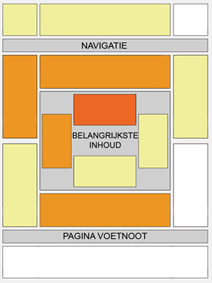
Verder heeft Google ook een lijstje gemaakt met de best presterende advertentievormen:
Tip: Wanneer je een nieuwe website maakt zorg dan dat je de verschillende advertentieposities bijhoud via de kanalen die je aan kunt maken bij je Adsense account. Zo krijg je een goed idee van het gedrag van je bezoekers en kun je de advertenties hier dus op aanpassen.
Zoals ik hierboven al aangaf is het belangrijk om de advertenties zoveel mogelijk op de content van je website te laten lijken. Dit kun je doen door de advertenties dezelfde kleuren te geven als het design van je website. Zijn alle links op je website bijvoorbeeld geel, maak de titel en de link van de advertentie dan ook geel. Is de bodytekst op je website rood, maak de bodytekst van je advertenties dan ook rood. Gebruik je een grijze achtergrond op je website, maak de achtergrond van je advertenties dan ook grijs..
De enige plaats waar het moeilijk is om een hoog doorklik ratio te halen is op fora. Omdat fora meestal een vaste groep bezoekers hebben worden zij snel “advertentie blind”. Een manier om dit tegen te gaan is het af en toe veranderen van de advertentiekleur of de omlijning van de advertentie. Zorg er wel voor dat het geen kermis wordt, je bezoekers zullen dit niet appreciëren. Het is beter om een doorklik ratio te hebben van 1% met 500 bezoekers dan 5% met maar 50 bezoekers.
Afbeeldingen bij de advertenties?
Over deze methode is de afgelopen maanden hard gediscussieerd. Google heeft er zelf ook op gereageerd op de Adsense blog.
Het komt erop neer dat het niet toegestaan is om afbeeldingen die direct verband hebben met de advertenties die getoond worden te plaatsen. Lees het artikel op de Adsense blog maar eens goed door en trek zelf je conclusies. Ik ga hier geen advies geven, ik kan alleen zeggen dat met een beetje fantasie er nog best wel wat mogelijk is met afbeeldingen. Het gebruiken van afbeeldingen bij je advertenties zorgt in ieder geval wél voor een veel hogere doorklik ratio.
Meerdere advertentieblokken
Volgens de Google TOS is het toegestaan om maximaal 3 advertentieblokken per pagina weer te geven. Net zoals bij de zoekresultaten van Google worden de advertenties waar het meeste voor betaald is als eerste geplaatst. Wanneer je genoeg ruimte hebt plaats dan alle drie de advertentieblokken. Je moet echter wel rekening houden met de verdiensten per advertentie. Ongeveer 60% van de opbrengsten worden uitgekeerd aan de publisher, jou dus (adverteerder betaalt 5 cent, jij krijgt 3 cent). Wanneer je derde advertentieblok maar 3-5 cent per klik oplevert is het verstandiger om deze weg te laten. Minder advertenties zorgt voor blijere bezoekers én de kans is groter dat ze op een advertentie klikken die meer oplevert per klik.
Tip: Zorg ervoor dat de best betalende advertenties op de beste presterende posities staan.
Commerciële en afilliate websites
Wanneer je een website beheert of bouwt waar de inkomsten moeten komen uit direct product verkoop of via afilliate verkoop (jij verkoopt dan een product van iemand anders en je krijgt hier een vergoeding voor) moet je jezelf afvragen of het wel verstandig is om Adsense te plaatsen. Ben je bereid om een klik van 10 of 20 euro op te geven voor een klik van 1 euro? Wanneer de bezoeker immers op een advertentie klikt zal hij niet snel meer terugkeren naar je verkooppagina. Je zult dit dus voor jezelf moeten testen. Mijn advies is om de bezoekers zo min mogelijk links (en dus ook advertenties) voor te schotelen wanneer je een product probeert te verkopen met je website.
Pay Per Click Arbitrage
Een manier om geld te verdienen is via PPC arbitrage. Het komt erop neer dat je via Adwords goedkoop bezoekers inkoopt (via de goedkope zoekwoorden) en ze dan naar een pagina stuurt met vaak alleen maar advertenties. Sommige hebben hier heel wat mee verdient maar de nieuwe regels van Google hebben roet in het eten gegooid. Google laat je namelijk meer betalen voor een zoekwoord wanneer de landingspagina (de pagina die de bezoekers te zien krijgen na het klikken op een advertentie) weinig of geen content bevat. Mijn advies is om geen tijd te steken in een dergelijk systeem. Je betaalt vaak evenveel voor een klik dan dat het oplevert en je bouwt ook geen constante inkomstenstroom op. Het is verstandiger om websites te bouwen met interessante content. Zo hoef je geen bezoekers in te kopen maar krijg je wel gratis bezoekers. Elke klik is dan pure winst.
Wanneer je nog meer informatie zoekt over Adsense optimalisatie raad ik je aan om eens te kijken op de Adsense optimalisatie tips pagina van Google.
Wanneer iemand nog suggesties of aanvullingen heeft plaats dan een reactie hieronder. Ik zal dit artikel dan updaten.
Opbouwen van een onderneming?
Webmasters die besloten hebben om hun geld te gaan verdienen met advertenties, de zogenaamde publishers, zijn grofweg in twee groepen te verdelen:
- Creëren van honderd websites waarvan elke website 1 euro per dag oplevert
- Creëren van één website die per dag 100 euro oplevert
Algemeen of niche?
Je kunt de website algemeen houden of je kunt kiezen voor een specifiek onderwerp. Wanneer je gebruik van Adsense wil maken is het over het algemeen verstandiger om over een specifiek onderwerp te schrijven:
- Algemeen
Er worden vaak slecht gerichte advertenties getoond
Bezoekers weten niet echt waar ze aan toe zijn
- Niche
Sterk gerichte advertenties wat een hoger doorklik ratio met zich meebrengt
Bezoekers gaan je eerder zien als een autoriteit wat loyale bezoekers met zich meebrengt (zeer belangrijk voor stabiele inkomsten)
Wanneer je door begint te krijgen hoe Adsense werkt op een website kun je naar onderwerpen gaan zoeken waar meer voor betaald wordt. Onderwerpen als auto’s, verzekeringen, hypotheken en dergelijke leveren veel op per klik. Maar dat weten andere mensen ook dus de concurrentie in deze markten is groot, heel groot. Vandaar dat het verstandiger is om met een wat kleinere markt te beginnen. Zo kun je ervaring op doen en misschien dat je dan op een dag wel klaar bent om de concurrentie aan te gaan!
Nieuwe websites, pagina’s en onderhoud
Wanneer je een nieuwe website aan het bouwen bent plaats er dan geen Adsense op voordat de website helemaal klaar is. Het is zelfs nog beter om te wachten met Adsense plaatsen totdat je een community hebt opgebouwd. Wanneer je bijvoorbeeld een website hebt waar nog “lorum ipsum” voorbeelden in staan zullen er meestal Google ads getoond worden die niets met je onderwerp te maken hebben. Vooral bij nieuwe pagina’s op bestaande websites is dit het geval. Zeker wanneer je een nieuw onderwerp aansnijd op je website. Het kan dagen en zelfs weken duren voordat de Google Media Bot weer langskomt om te bekijken wat voor advertenties er bij die nieuwe pagina passen.
Tip: wanneer je website veel bezoekers krijgt van verschillende ip-adressen zal dit proces veel sneller gaan. Omdat Google ziet dat de bestaande advertenties op je website door veel bezoekers wordt bekeken zullen ze beter hun best doen om gerichte advertenties te tonen. (Ook uit eigenbelang natuurlijk, des te meer kliks des te meer cash voor Google..)
Tip: het is ook verstandig om de advertenties op te vragen via een include element. Wanneer je dan je advertenties aan wil passen hoef je niet elke pagina apart te veranderen maar kun je dit vanuit 1 file doen.
Het monitoren van url’s en kanalen
Via je Adsense account kun je kanalen aanmaken die je dan gemakkelijk kunt monitoren. Verder kun je ook gebruik maken van url statistieken, zo kun je bijhouden welke website het meest oplevert. Kanalen gebruik je dus om specifieke advertentieblokken binnen een website bij te houden en url statistieken gebruik je om websites ten opzichte van elkaar bij te houden.
Het bijhouden van je statistieken is één van de belangrijkste succesfactoren. Zorg dus dat je dit goed uitwerkt zodat je bij kunt houden welke websites geld opleveren en welke advertentieblokken het meest succesvol zijn.
Website design en integratie
Wanneer je besloten hebt om Adsense te gaan gebruiken op je website zul je moeten gaan bepalen waar je de advertenties gaat plaatsen. Bij een nieuwe website gaat dit gemakkelijker omdat je tijdens het bouwen nog rekening kunt houden met de plaatsing van je ads. Bij een bestaande website ligt het wat moeilijker omdat je dan rekening moet houden met het bestaande design.
Hoewel elke website anders is heeft Google wel een overzicht gemaakt van de best presterende plaatsen, de zogenaamde heatmaps. Hieronder vind je een dergelijke heatmap.
Verder heeft Google ook een lijstje gemaakt met de best presterende advertentievormen:
- 336×280 rechthoek
- 300×250 rechthoek
- 160×600 skyscraper
Tip: Wanneer je een nieuwe website maakt zorg dan dat je de verschillende advertentieposities bijhoud via de kanalen die je aan kunt maken bij je Adsense account. Zo krijg je een goed idee van het gedrag van je bezoekers en kun je de advertenties hier dus op aanpassen.
Zoals ik hierboven al aangaf is het belangrijk om de advertenties zoveel mogelijk op de content van je website te laten lijken. Dit kun je doen door de advertenties dezelfde kleuren te geven als het design van je website. Zijn alle links op je website bijvoorbeeld geel, maak de titel en de link van de advertentie dan ook geel. Is de bodytekst op je website rood, maak de bodytekst van je advertenties dan ook rood. Gebruik je een grijze achtergrond op je website, maak de achtergrond van je advertenties dan ook grijs..
De enige plaats waar het moeilijk is om een hoog doorklik ratio te halen is op fora. Omdat fora meestal een vaste groep bezoekers hebben worden zij snel “advertentie blind”. Een manier om dit tegen te gaan is het af en toe veranderen van de advertentiekleur of de omlijning van de advertentie. Zorg er wel voor dat het geen kermis wordt, je bezoekers zullen dit niet appreciëren. Het is beter om een doorklik ratio te hebben van 1% met 500 bezoekers dan 5% met maar 50 bezoekers.
Afbeeldingen bij de advertenties?
Over deze methode is de afgelopen maanden hard gediscussieerd. Google heeft er zelf ook op gereageerd op de Adsense blog.
Het komt erop neer dat het niet toegestaan is om afbeeldingen die direct verband hebben met de advertenties die getoond worden te plaatsen. Lees het artikel op de Adsense blog maar eens goed door en trek zelf je conclusies. Ik ga hier geen advies geven, ik kan alleen zeggen dat met een beetje fantasie er nog best wel wat mogelijk is met afbeeldingen. Het gebruiken van afbeeldingen bij je advertenties zorgt in ieder geval wél voor een veel hogere doorklik ratio.
Meerdere advertentieblokken
Volgens de Google TOS is het toegestaan om maximaal 3 advertentieblokken per pagina weer te geven. Net zoals bij de zoekresultaten van Google worden de advertenties waar het meeste voor betaald is als eerste geplaatst. Wanneer je genoeg ruimte hebt plaats dan alle drie de advertentieblokken. Je moet echter wel rekening houden met de verdiensten per advertentie. Ongeveer 60% van de opbrengsten worden uitgekeerd aan de publisher, jou dus (adverteerder betaalt 5 cent, jij krijgt 3 cent). Wanneer je derde advertentieblok maar 3-5 cent per klik oplevert is het verstandiger om deze weg te laten. Minder advertenties zorgt voor blijere bezoekers én de kans is groter dat ze op een advertentie klikken die meer oplevert per klik.
Tip: Zorg ervoor dat de best betalende advertenties op de beste presterende posities staan.
Commerciële en afilliate websites
Wanneer je een website beheert of bouwt waar de inkomsten moeten komen uit direct product verkoop of via afilliate verkoop (jij verkoopt dan een product van iemand anders en je krijgt hier een vergoeding voor) moet je jezelf afvragen of het wel verstandig is om Adsense te plaatsen. Ben je bereid om een klik van 10 of 20 euro op te geven voor een klik van 1 euro? Wanneer de bezoeker immers op een advertentie klikt zal hij niet snel meer terugkeren naar je verkooppagina. Je zult dit dus voor jezelf moeten testen. Mijn advies is om de bezoekers zo min mogelijk links (en dus ook advertenties) voor te schotelen wanneer je een product probeert te verkopen met je website.
Pay Per Click Arbitrage
Een manier om geld te verdienen is via PPC arbitrage. Het komt erop neer dat je via Adwords goedkoop bezoekers inkoopt (via de goedkope zoekwoorden) en ze dan naar een pagina stuurt met vaak alleen maar advertenties. Sommige hebben hier heel wat mee verdient maar de nieuwe regels van Google hebben roet in het eten gegooid. Google laat je namelijk meer betalen voor een zoekwoord wanneer de landingspagina (de pagina die de bezoekers te zien krijgen na het klikken op een advertentie) weinig of geen content bevat. Mijn advies is om geen tijd te steken in een dergelijk systeem. Je betaalt vaak evenveel voor een klik dan dat het oplevert en je bouwt ook geen constante inkomstenstroom op. Het is verstandiger om websites te bouwen met interessante content. Zo hoef je geen bezoekers in te kopen maar krijg je wel gratis bezoekers. Elke klik is dan pure winst.
Wanneer je nog meer informatie zoekt over Adsense optimalisatie raad ik je aan om eens te kijken op de Adsense optimalisatie tips pagina van Google.
Wanneer iemand nog suggesties of aanvullingen heeft plaats dan een reactie hieronder. Ik zal dit artikel dan updaten.
Abonneren op:
Posts (Atom)